
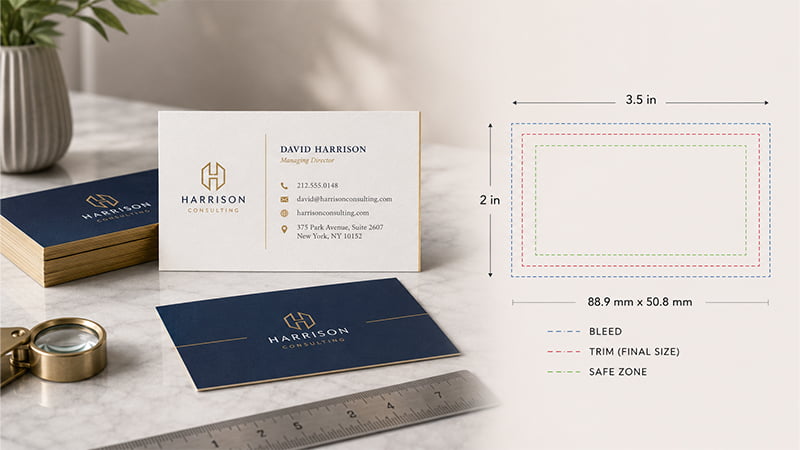
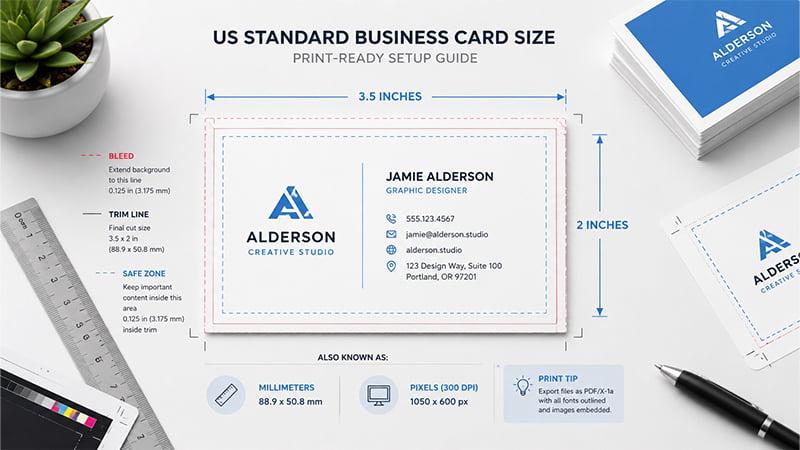
The standard business card size in the US is 3.5 x 2 inches, but a print-ready file needs more than the final trim size. This guide gives you business card dimensions in inches, millimeters and pixels, then explains bleed, safe zone, regional sizes and file setup steps so your cards print cleanly in bulk.
Quick Answer: What Is the Standard Business Card Size?
The most common standard business card size in the United States and Canada is 3.5 x 2 inches. It fits easily into wallets, pockets, card holders, trade show folders and desk organizers. That makes it a practical choice for sales teams, business meetings, networking events and daily brand communication.
In millimeters, a US standard business card is about 88.9 x 50.8 mm, often rounded to 89 x 51 mm. In many UK and European markets, a common business card size is 85 x 55 mm. Japan often uses a slightly taller format, around 91 x 55 mm, especially for formal business exchange. Adobe’s business card size guide lists common regional sizes, including UK/Europe at 85 x 55 mm, US/Canada at 89 x 51 mm, and Japan at 91 x 55 mm.
For digital design, a standard 3.5 x 2 inch business card at 300 DPI equals 1050 x 600 pixels. If your design includes bleed, the canvas should be larger than the final trim size. That extra space gives the printer room to cut the cards cleanly without leaving unwanted white edges.
Business Card Size Chart: Inches, Millimeters and Pixels
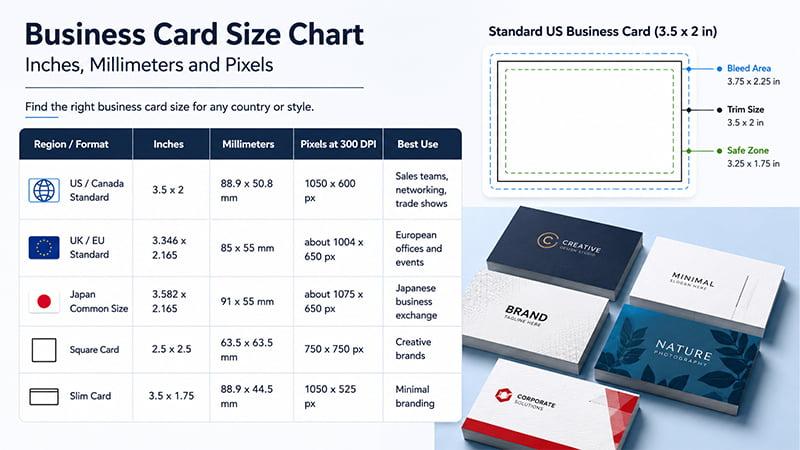
Use this quick chart when setting up a business card file or checking your supplier’s template.
| Region / Format | Inches | Millimeters | Pixels at 300 DPI | Best Use |
|---|---|---|---|---|
| US / Canada Standard | 3.5 x 2 | 88.9 x 50.8 mm | 1050 x 600 px | Sales teams, networking, trade shows |
| UK / EU Standard | 3.346 x 2.165 | 85 x 55 mm | about 1004 x 650 px | European offices and events |
| Japan Common Size | 3.582 x 2.165 | 91 x 55 mm | about 1075 x 650 px | Japanese business exchange |
| Square Card | 2.5 x 2.5 | 63.5 x 63.5 mm | 750 x 750 px | Creative brands |
| Slim Card | 3.5 x 1.75 | 88.9 x 44.5 mm | 1050 x 525 px | Minimal branding |
For bulk custom printing, confirm the final template with your supplier before artwork approval. This matters even more when the cards are part of a branded stationery set, trade show kit or corporate gift package.
Online Printing Templates vs Standard Business Card Sizes
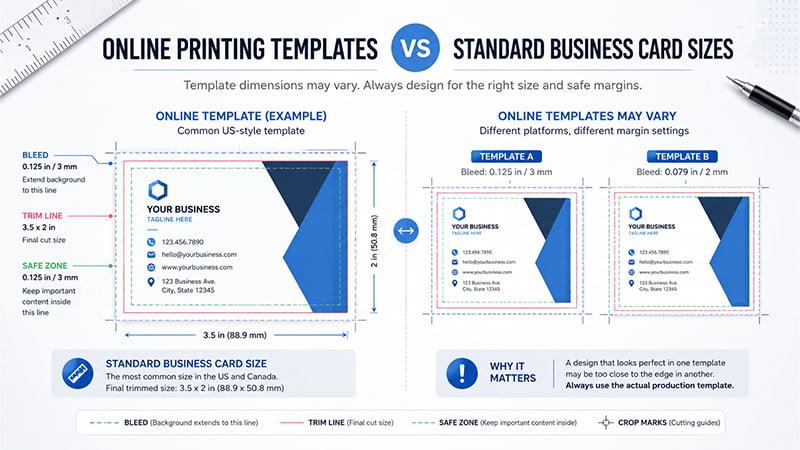
Many buyers check Vistaprint business card sizes or other online printing templates before creating artwork. These templates are helpful for reference, but they should not be your only standard unless you are ordering from that exact platform.
Most online printing templates for US-style business cards use the common 3.5 x 2 inch trim size. That matches the standard business card size used across the United States and Canada. The full artwork size is usually larger because print-ready files need bleed. The safe area is smaller because text, logos, QR codes and contact details should stay away from the cutting edge.
Why online template dimensions may vary
Different printing platforms and suppliers may use slightly different bleed, trim and safe zone requirements. One supplier may ask for a 0.125 inch / 3 mm bleed, while another may provide a downloadable artwork template with its own margin settings.
A card may look correct in one design system but still need adjustment before bulk production with another supplier. For custom orders, the safest approach is to prepare the artwork based on the actual production template.
What to confirm before printing
Before approving business card artwork, confirm these details with your supplier:
- final trim size
- bleed area
- safe zone
- file format
- color mode
- logo file type
- QR code position
- proofing requirements
For regular US business cards, a 3.5 x 2 inch size is usually a safe starting point. For custom bulk orders, the final production template should always come from your actual supplier.
Supplier advice for custom business card orders
When business cards are part of a larger branded project, such as a stationery set, trade show kit, employee welcome pack or corporate gift box, check the card size together with the folder, envelope, card holder, notebook, lanyard or packaging insert.
TOMAS Crafts can help buyers review business card artwork, logo placement, paper finish and packaging compatibility before production. This keeps the final printed cards consistent with the rest of your branded materials.
Regional Business Card Dimensions
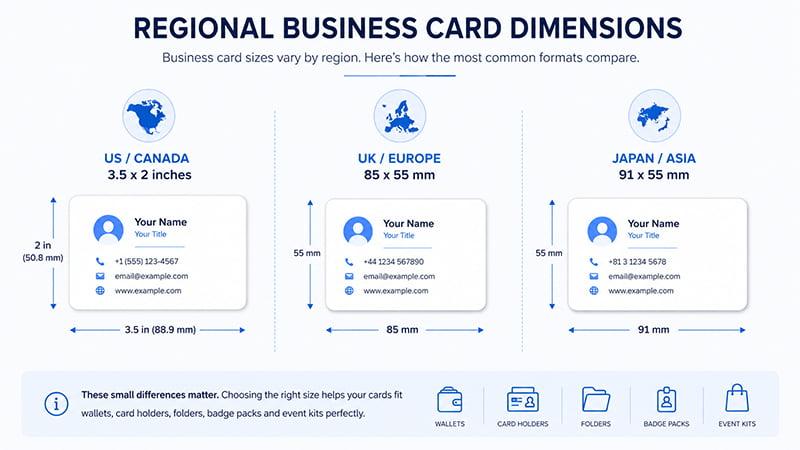
Business card dimensions are not the same in every market. The differences are small, but they matter when cards need to fit wallets, card holders, folders, badge packs or event kits.
US and Canada business card size
The common business card size in the US and Canada is 3.5 x 2 inches. This is a safe choice for North American sales teams, networking events, trade shows and corporate use.
UK and European business card size
The common UK and European business card size is 85 x 55 mm. This format is slightly different from the US size and often works better for European offices, events and card holder formats.
Japan and broader Asia business card size
Japan often uses around 91 x 55 mm. For Asian or international events, confirm the local market preference before production. This helps avoid size problems when cards are prepared for distributor meetings, exhibitions or regional client visits.
| Target Market | Recommended Size |
|---|---|
| US / Canada | 3.5 x 2 inches |
| UK / EU | 85 x 55 mm |
| Japan | Around 91 x 55 mm |
| Global trade show | Choose based on target customer market |
| Corporate stationery set | Match with folders, card holders and packaging |
Bleed, Trim Line and Safe Zone Explained
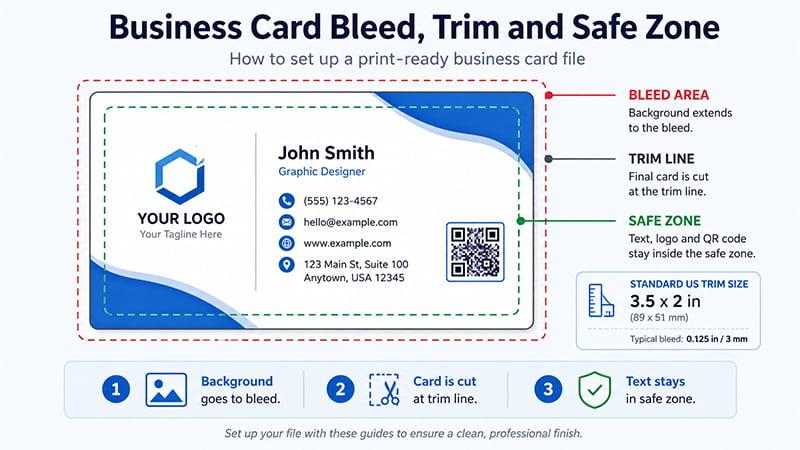
A business card does not start and end with the visible final size. Print-ready files need three areas: bleed, trim and safe zone.
What is bleed?
Bleed is the extra artwork area outside the final cut line. If your card has a background color, image, pattern or full-edge design, that artwork should extend into the bleed area.
Bleed prevents unwanted white borders after cutting. Even with accurate equipment, small movement can happen during trimming. The bleed gives the printer extra room so the background still reaches the edge of the final card.
What is trim size?
Trim size is the final card size after cutting. For a US standard business card, the trim size is usually 3.5 x 2 inches.
When someone asks for the “size of business card,” they are usually asking for the trim size. When creating print-ready artwork, also check the bleed size and safe zone.
What is the safe zone?
The safe zone is where important content should stay. Keep names, phone numbers, emails, websites, logos and QR codes inside this area.
If important content sits too close to the edge, it may be cut off or look unbalanced after trimming. This is especially risky for small text, thin lines and QR codes.
A simple design rule:
Background goes to the bleed.
The card is cut at the trim line.
Text, logos and QR codes stay inside the safe zone.
A clear bleed / trim / safe zone diagram is worth adding here. Many printing mistakes happen when buyers only prepare the final trim size and forget the extra artwork space.
Design and File Setup Guidelines for Print-Ready Cards
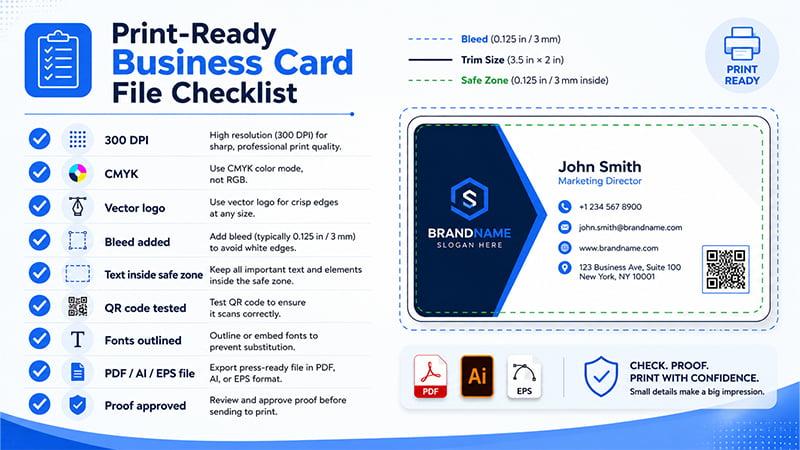
A correct business card size helps, but the file setup controls how professional the final card looks. Before sending artwork to a printer or supplier, check these design details.
Font size and readability
Business cards are small, so every word needs to earn its space. Avoid tiny text, especially for phone numbers, emails, addresses and social handles.
Use a clear hierarchy:
- Name or company name should be easy to scan.
- Job title should be readable but secondary.
- Contact details should be clean and not crowded.
- Extra text should be kept minimal.
Slim cards and mini cards need even fewer details because the available space is smaller.
Logo placement
Keep logos inside the safe zone. Do not place logos too close to rounded corners, die-cut edges or the trim line.
If the logo touches the edge, even a small cutting shift can make the design feel unbalanced. For corporate projects, confirm logo size and brand color before proof approval.
When the same logo will appear across business cards, folders, notebooks, pens, lanyards and packaging, one artwork mistake can affect the full branded set. Check the logo file early, not after production starts.
QR code placement
QR codes are useful on modern business cards, but they need space. Keep the QR code inside the safe zone and leave enough white space around it. Do not place it too close to the trim line.
Before bulk production, scan the QR code from a printed proof or at least from the final artwork size. A code that works on screen may become harder to scan if it is printed too small or placed too close to the card edge.
Color mode and brand color
For printing, suppliers may require CMYK files. Screens show colors in RGB, while commercial printing often works in CMYK. That is why screen colors and printed colors may not look exactly the same.
For strict brand color matching, use Pantone references or approved brand color values when available. This helps corporate teams keep business cards consistent with other branded materials.
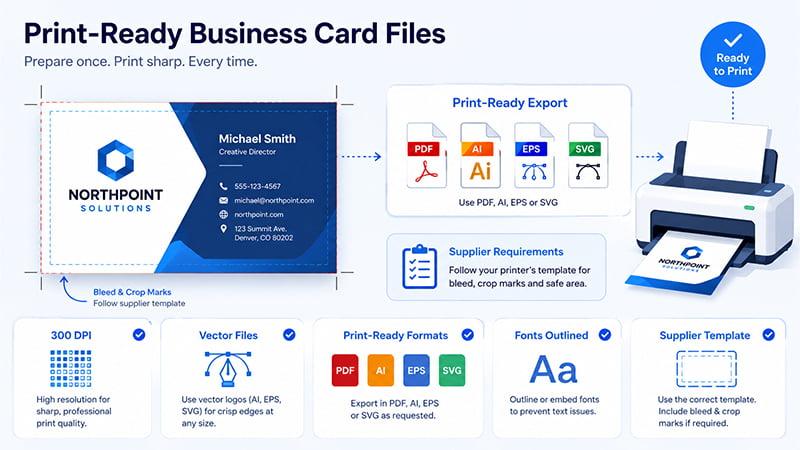
Use 300 DPI and vector files
Photos, textures and raster graphics should be prepared at 300 DPI for print clarity. Low-resolution images may look acceptable on screen but print blurry.
Logos should preferably be vector files. AI, EPS, SVG or editable PDF files are better for logos because they keep edges sharp. PNG or JPG files may be acceptable for preview, but they can be risky for final printing if the resolution is too low.
Export according to supplier requirements
Use print-ready PDF, AI or EPS files when requested. Embed fonts or convert text to outlines if the supplier needs editable vector artwork. Avoid over-compressing images because heavy compression can reduce print quality.
Follow the supplier’s instructions for crop marks, bleed and file upload. Adobe’s print setup guidance shows how crop marks and bleed settings can be added when exporting PDF files for printing.
Some printers want crop marks included; others prefer clean files based on their own template. When in doubt, ask before final artwork approval.
Standard, Slim, Square and Die-Cut Business Cards
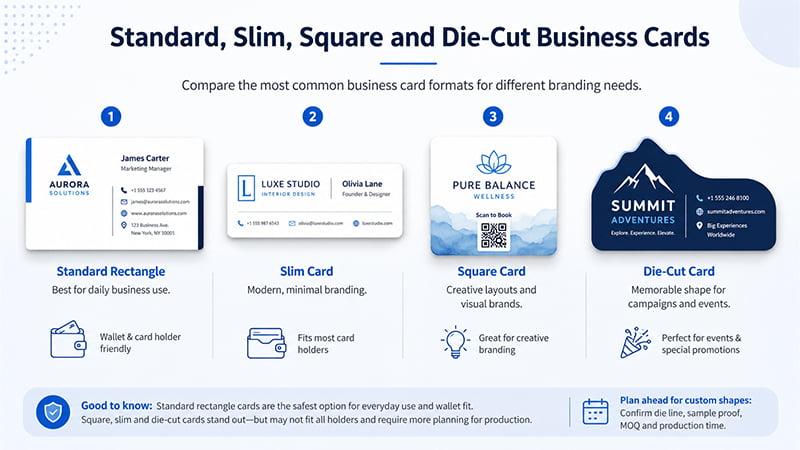
The standard rectangle is the safest business card format, but other shapes can work well for specific campaigns.
Standard rectangle cards
Standard rectangle cards are best for daily business use, trade shows, sales teams and corporate stationery. They are easy to store, hand out and fit into wallets or card holders. If the goal is practical networking, this is usually the best choice.
Slim cards
Slim cards, often around 3.5 x 1.75 inches, work well for boutique, lifestyle and minimalist branding. They feel modern and clean, but they also leave less room for contact details, QR codes and long company information.
Square cards
Square cards can highlight logos, product visuals and creative layouts. They are a good fit for design-focused brands, product campaigns and special event cards.
The downside is wallet compatibility. Some square cards may not fit standard card holders or business card pockets.
Die-cut cards
Die-cut cards are useful for brand campaigns, packaging inserts and special event presentation. They can make a business card feel more memorable, but buyers need to confirm MOQ, die line, sample proof, packaging and production time before ordering.
Avoid complex die-cut designs for urgent orders. Extra shape checks, sample confirmation and packaging protection can extend the timeline.
Common Printing Mistakes and TOMAS Crafts Supplier Advice
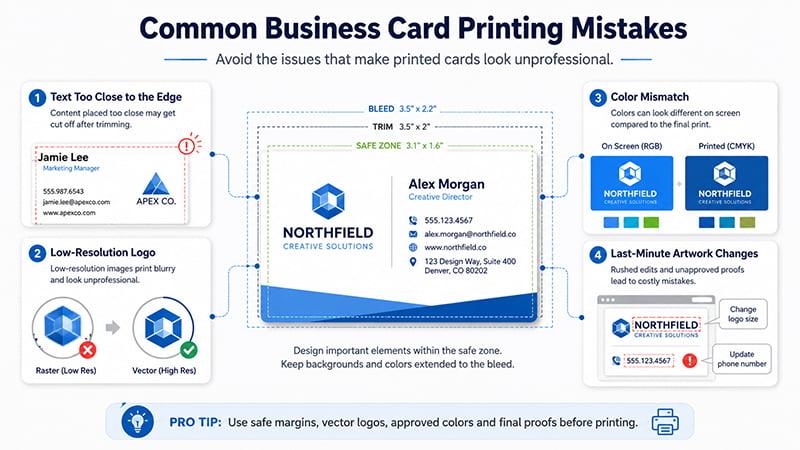
A correct size does not guarantee a good printed card. In bulk stationery projects, most problems do not come from the card size itself. They usually come from tight margins, unclear logo files, color mismatch or last-minute artwork changes.
Placing text too close to the edge
During bulk trimming, slight movement can happen. Keep text, QR codes and logos away from the edge to avoid an unbalanced final look. Do not rely on the trim line as a design boundary. Use the safe zone as your real design limit.
This matters more for cards with thin borders. A thin border may look perfect on screen, but after cutting, one side can appear thicker than the other.
Using low-resolution logos
A logo may look clear on screen but print blurry if the file is low resolution. For branded business cards, vector files are safer because they keep logo edges sharp at different sizes.
If only PNG or JPG files are available, check the actual resolution before printing. Do not stretch small logo files to fit a larger design area.
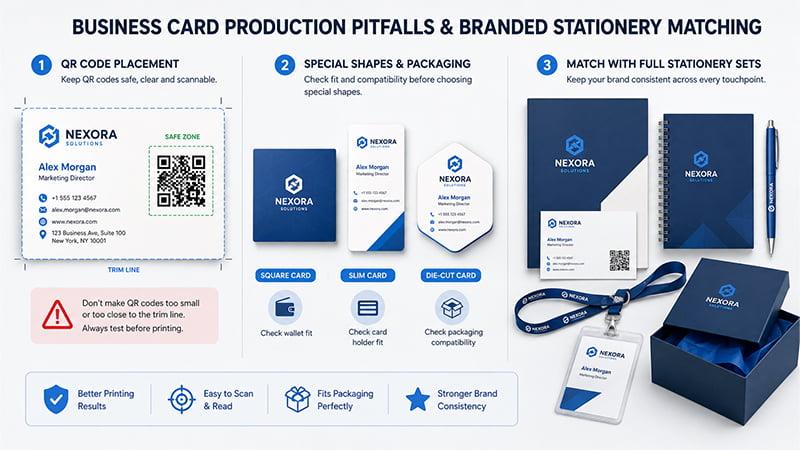
Making QR codes too small or too close to the trim line
QR codes need enough size and white space to scan properly. They should stay inside the safe zone and be tested before production.
If the card includes a QR code for a website, catalog, event page or contact form, test the final code before printing. Also check that the linked page is active and mobile-friendly.
Choosing special shapes without checking packaging
Square, slim, folded or die-cut cards can look distinctive, but check wallet fit, card holder fit, packaging and distribution method before choosing them.
For example, a special shape may look attractive but create problems if it needs to fit inside a folder pocket, welcome kit, envelope or gift box insert.
Match business cards with full stationery sets
For corporate events, trade shows and client gift projects, TOMAS Crafts can help match business cards with folders, notebooks, pens, lanyards, card holders and packaging. This keeps the logo, color, paper finish and presentation style consistent across the full branded set.
For many corporate projects, the business card is only one part of the full branded package. Matching it with notebooks, folders, pens, lanyards and packaging makes the whole project look more organized. This is especially helpful for larger custom office supplies or corporate gift solutions projects.
Buyer Situation: Safer Business Card Choices
Use this table when choosing a format for business cards, event kits or branded stationery projects.
| Buyer Situation | Safer Choice |
|---|---|
| Urgent trade show order | Standard 3.5 x 2 inch card |
| Strict brand color requirement | Confirm CMYK or Pantone before proof approval |
| QR code business card | Use a larger safe zone and test scanning |
| Premium client gift set | Thicker paper, simple layout and matching packaging |
| Die-cut or special shape design | Confirm sample proof, MOQ and packing method first |
| International event | Choose size based on the target customer market |
Pre-Flight Checklist Before Printing
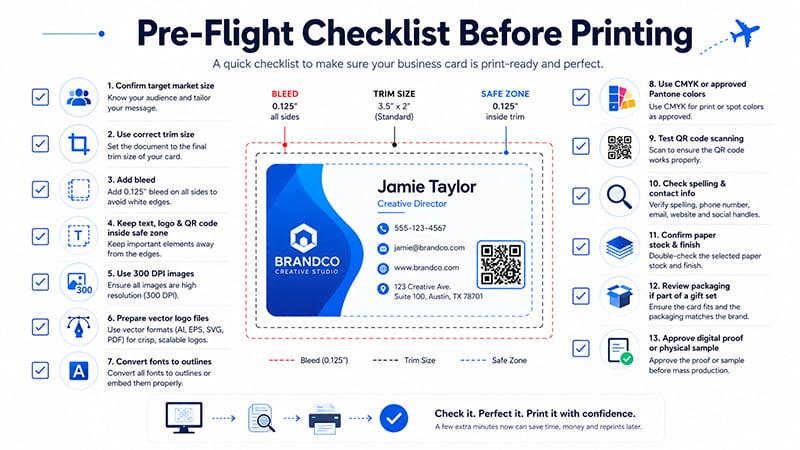
Before sending your business card file for production, check these items:
- Confirm the target market size.
- Use the correct trim size.
- Add bleed.
- Keep text, logos and QR codes inside the safe zone.
- Use 300 DPI images.
- Prepare vector logo files.
- Convert fonts to outlines if needed.
- Use CMYK or approved Pantone colors.
- Test QR code scanning.
- Check spelling, phone number, email, website and social handles.
- Confirm paper stock and finish.
- Review packaging if cards are part of a gift set.
- Approve a digital proof or physical sample before mass production.
Conclusion
The standard business card size in the US is 3.5 x 2 inches, while the common UK and European size is 85 x 55 mm. For print-ready artwork, buyers also need to check bleed, trim, safe zone, resolution, color mode and file format.
If the cards are part of a corporate stationery set, trade show kit or branded gift package, size should be considered together with material, finish, packaging and matching office supplies. A clean file setup saves time, reduces printing mistakes and helps the final card look professional.
Build a Consistent Branded Stationery Set with TOMAS Crafts
Preparing business cards for a trade show, corporate event or client gift set? TOMAS Crafts can help you match the card size, logo placement, paper finish and packaging with the rest of your branded materials, such as folders, notebooks, pens, lanyards and card holders. Share your logo, quantity, target market and deadline, and our team can suggest a practical setup for bulk production. You can also contact TOMAS Crafts for custom stationery and promotional gift project support.
FAQs
What is the standard business card size?
The standard business card size in the US is 3.5 x 2 inches. In many UK and European markets, a common size is 85 x 55 mm.
What size is a business card in pixels?
At 300 DPI, a standard 3.5 x 2 inch business card is 1050 x 600 pixels. If the design includes bleed, the canvas size should be larger.
What is the bleed size for a business card?
Bleed is the extra artwork area outside the final trim line. A common bleed margin is around 0.125 inch / 3 mm on each side, but buyers should always follow the printer or supplier’s template.
Are online printing template sizes the same as standard business card sizes?
Most online printing templates for US-style business cards use the common 3.5 x 2 inch trim size, but bleed and safe zone settings may vary by supplier. For bulk custom printing, confirm the exact template with your own supplier before production.